Loading…
Mathbound 3D: Grade Quest
Run. Jump. Solve your way through.
Mathbound 3D: Grade Quest
A 3D math adventure from Kindergarten to Grade 12: run, jump and open each gate with 5 correct answers across 650 stages.
About the Game
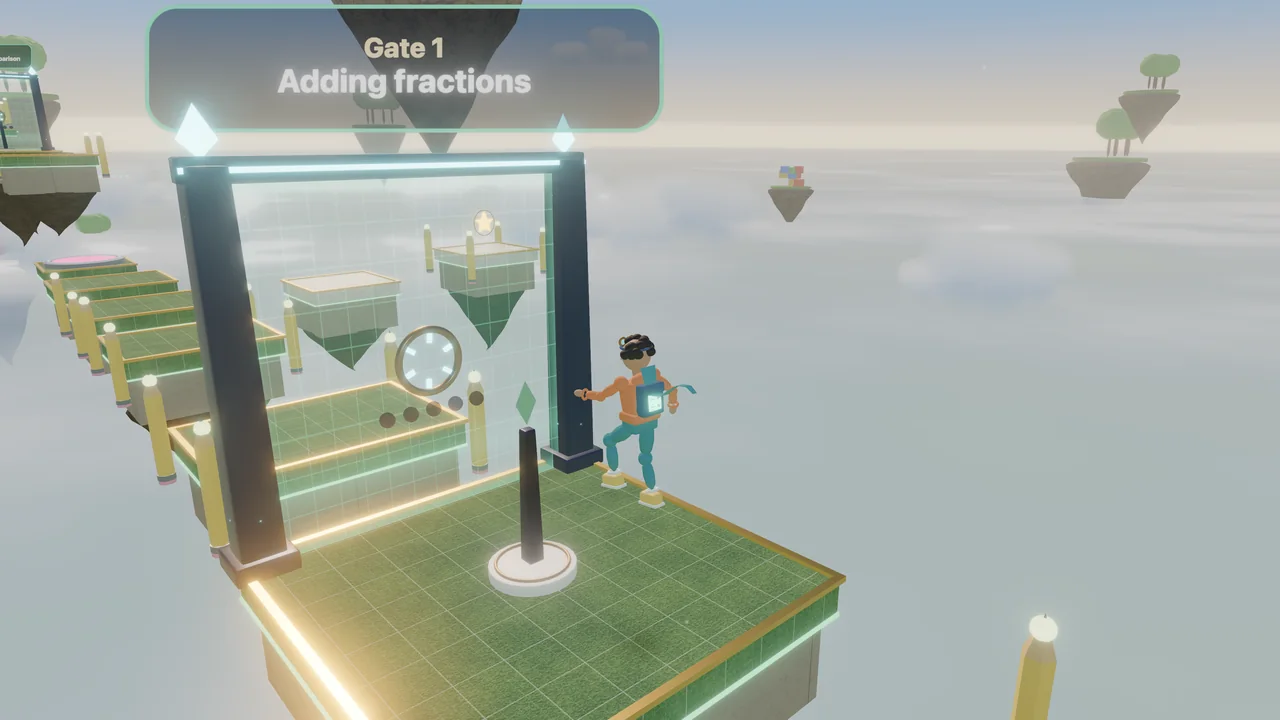
Mathbound 3D: Grade Quest is a third-person 3D math adventure. You play Nova, a young explorer, in a plaza with thirteen doors — one for every grade from Kindergarten to Grade 12, grouped into Elementary (K–5), Middle School (6–8) and High School (9–12). Each grade has 50 stages: obstacle courses of floating platforms, moving ferries, spring pads, crumbling tiles, sweeping rulers, laser beams and updrafts, broken up by glowing math gates. Stop at a gate and answer multiple-choice questions on that stage's topic; five correct answers open it. A wrong answer or running out of time never opens the gate — instead you see the right answer and a short worked explanation, then get a new question, and the correct answers you already earned are kept. The topics follow the Common Core State Standards for Mathematics (CCSS-M) grade by grade, from counting and shapes to fractions, ratios, linear equations, the Pythagorean theorem, quadratics, trigonometry, logarithms, probability and an introduction to limits and derivatives; the high-school grades follow a typical Algebra I, Geometry, Algebra II and Precalculus sequence. Every question is generated from a template with exactly one correct answer, checked by an independent calculation, and wrong choices built from common mistakes. Stages give up to three stars — finish, collect every golden number star, and answer at least 80 % of questions correctly — and a Skills page tracks your mastery of each topic and opens untimed practice for the concepts you missed. Questions can be timed, relaxed (double time) or untimed. Every one of the 650 stages was completed by an autopilot through the real game physics before release.
How to Play
Press Play, then walk Nova into the door for your grade: Elementary on the left, Middle School straight ahead, High School on the right (or use the Grades button). Pick a stage on the map and press Start. Move with W A S D or the arrow keys, jump with Space, and press Space again in mid-air to double jump; drag the mouse to look around. On a phone, drag on the screen to move and tap Jump. When you reach a glowing gate, a question appears: choose one of the four answers by tapping it or pressing 1 to 4. Five correct answers open the gate. If an answer is wrong or the time runs out, read the explanation and try the next question — your correct answers so far are kept. Touch the beacons to save your place, collect the golden number stars, and reach the finish ring. Use the Skills tab on a grade's map to see your mastery and practise missed concepts without a timer.
Controls
- W A S D / Arrow keysMove
- SpaceJump (press again in the air to double jump)
- Drag the mouseLook around
- 1–4 or A–DChoose an answer at a gate
- Esc / PPause
- Touch: drag on the screen to move, Jump button on the right, tap an answerTouch: drag on the screen to move, Jump button on the right, tap an answer
Features
- 13 grades, Kindergarten to Grade 12, with 50 stages each — 650 in all
- Common Core (CCSS-M)–aligned topics, with the standard shown on every question
- Gates that open with 5 correct answers; worked explanations after every miss
- Timed, relaxed or untimed questions, plus an untimed practice lab
- Stars, topic mastery, a missed-concepts list and a daily streak, saved on your device
- Real-time 3D worlds for each school band and an original character made in Blender
Gameplay Tips
- Read the explanation after a miss: the next question is on the same skill.
- Switch to Relaxed or Untimed questions in the pause menu if the clock feels too fast.
- Jump just before the edge of a platform, and use the double jump for long gaps.
- Number stars on side paths are optional, but you need all of them for the second star.
- Stages 46 to 50 of each grade mix every topic — a good check before the next grade.
FAQ
What is Mathbound 3D?
A free 3D math adventure on ZOQSY. You run and jump through obstacle courses and open gates by answering math questions for your grade, from Kindergarten to Grade 12.
Which curriculum does it follow?
The topics are aligned with the Common Core State Standards for Mathematics (CCSS-M), and each question shows its standard code. Grades 9–12 follow a typical Algebra I, Geometry, Algebra II and Precalculus sequence; the limits and derivatives topic in Grade 12 goes slightly beyond CCSS. It is not a complete curriculum or a substitute for a teacher.
What happens if I answer wrong?
The gate stays locked. You see the correct answer and a short explanation, then get a new question on the same skill. The correct answers you already earned are kept, so you always make progress.
Can I turn off the timer?
Yes. In the pause menu or on the title screen, choose Timed, Relaxed (double time) or Untimed. The practice lab is always untimed.
Is every stage possible?
Yes. Every one of the 650 stages was completed by an autopilot through the real game physics, on the main path and through every number star, with deliberately early and late jumps, before release.
Can I play on my phone?
Yes — drag on the screen to move, tap Jump, and tap the answers. If it runs slowly, choose a lower graphics setting in the pause menu.
Is my progress saved?
Yes — stars, unlocked stages, topic mastery and missed questions are saved in your browser on this device. No account is needed.