ALPHA Clicker
A Moroccan-developed classroom response system for interactive learning.
ALPHA Clicker is a classroom response system developed in Morocco by Had Saad: students answer questions with physical A/B/C/D remotes, and ALPHA turns their answers into live classroom games.
- Type
- Student response system
- Buttons
- A · B · C · D
- Developed by
- Had Saad
- Developed in
- Morocco
What is ALPHA Clicker?
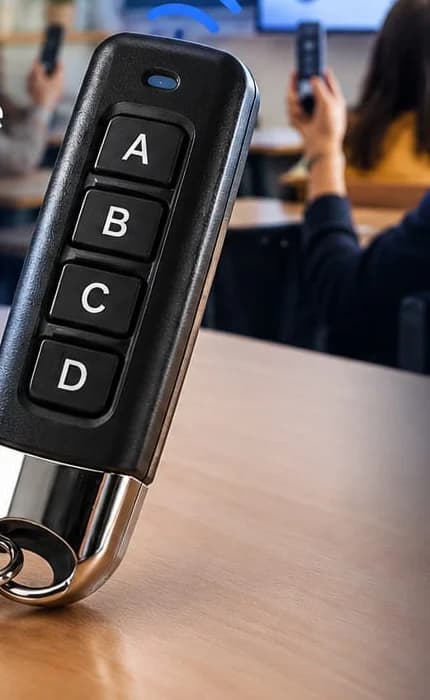
ALPHA Clicker is a student response system — also known as a classroom response system or classroom clicker. Every student in the room holds a small physical remote with four buttons, A, B, C and D, and answers the teacher's multiple-choice questions by pressing one of them.
It is the hardware side of ALPHA, the educational system presented by ZOQSY. ALPHA receives the students' answers and turns a lesson into a competitive classroom game, so that each question becomes a move in a race, a tournament or a team battle.
The relationship is simple: ZOQSY presents ALPHA; ALPHA Clicker is how students take part in ALPHA; and both were developed by Had Saad in Morocco.
From question to classroom game
Five steps, repeated for every question of the lesson.
- 1
The teacher asks a question
A multiple-choice question from the teacher's own ALPHA lesson appears on the classroom screen.
- 2
Students press A, B, C or D
Every student answers at the same time on their own ALPHA Clicker remote.
- 3
The answer is transmitted
The remote sends its number and the button pressed by radio to a receiver plugged into the teacher's computer (USB).
- 4
ALPHA receives the responses
ALPHA credits each answer to the student linked to that remote. The first answer is final; late answers do not count.
- 5
The class sees the result
The game reacts on the screen or projector: a runner advances, a team scores, the ranking updates.
The ALPHA Clicker remote
A physical student response device: no screen, no app to open, no account for the student.
Four answer buttons
A, B, C and D — one press is one answer, matching the four choices of a multiple-choice question.
One number per remote
Each remote has its own number, from 1 to 40, so every answer is attributed to the right student.
Linked in one press
To assign a remote, the teacher asks the student to press any button. That press is used only to link the remote and never counts as an answer.
Teacher-controlled sessions
The teacher opens each question, can pause, skip or end the game, and sees every press in a journal (accepted, late, already answered…).
Behind the scenes, a radio receiver connected to an Arduino board is plugged into the teacher's computer by USB. It reports each press as the remote's number and the button, and ALPHA does the rest. If the receiver is unplugged, ALPHA shows it, reconnects automatically, and never replays old presses as new answers.
Not just a paper QCM on a remote
The questions can be the same multiple-choice questions. What changes is what happens to the answers.
| Paper QCM | ALPHA Clicker with ALPHA |
|---|---|
| Paper QCMAnswers are collected and corrected after the lesson. | ALPHA Clicker with ALPHAEvery answer is recorded the moment the student presses the button. |
| Paper QCMThe class sees the result later, if at all. | ALPHA Clicker with ALPHAThe result appears on the screen straight away, as part of a game. |
| Paper QCMParticipation is individual and silent. | ALPHA Clicker with ALPHAThe whole class answers the same question at the same moment. |
| Paper QCMResults must be copied by hand. | ALPHA Clicker with ALPHAALPHA keeps per-student and per-question results for each session. |
One lesson, many classroom games
Teachers write their own multiple-choice lessons in ALPHA Teacher. ALPHA Clicker answers drive every ALPHA game.
BAC Championship
A knockout tournament for 2 to 40 students: two students race on the same question — a right answer moves forward, a wrong one moves back.
ALPHA Arena games
In ALPHA Desktop, a library of more than 20 classroom games — races, team battles, cooperative missions and rankings — all played with the teacher's lesson and the same remotes.
Results and ranking
Each session ends with a ranking and keeps per-student and per-question statistics the teacher can review later.
Two ways to run it. ALPHA Desktop is a macOS application that works without Internet: it reads the remotes over USB and keeps classes, lessons and results on the teacher's computer. ALPHA Teacher on the website runs in Google Chrome on a computer, with a small local program that connects the receiver. A Windows version is not available yet.
Learn more about the whole system on the ALPHA overview page.
Designed for Moroccan classrooms
ALPHA Clicker was developed in Morocco with Moroccan schools in mind. ALPHA organises classes by the Moroccan school levels — primaire, collège and lycée — and its first game, the BAC Championship, is built around revision for the Baccalauréat.
Lessons can be written in French, Arabic or English, and Arabic lessons are displayed right-to-left in the games. The games are designed to be shown on a classroom projector, with a dedicated projector display mode in ALPHA Desktop.

Created by Had Saad
ALPHA Clicker was developed by Had Saad as part of the ALPHA educational system at ZOQSY.
About Had Saad →ALPHA Clicker en français et en arabe
Un système de réponse pour la classe
ALPHA Clicker est un système de réponse en classe développé au Maroc par Had Saad, au sein du système éducatif ALPHA présenté par ZOQSY. Chaque élève dispose d'une télécommande avec quatre boutons — A, B, C et D — et répond aux questions QCM de l'enseignant au même moment que toute la classe. Un récepteur branché en USB sur l'ordinateur de l'enseignant reçoit les réponses, et ALPHA les transforme en jeux de classe affichés au vidéoprojecteur.
نظام الإجابة التفاعلي للتلاميذ داخل القسم
ALPHA Clicker نظام إجابة تفاعلي للتلاميذ، طُوِّر في المغرب من طرف Had Saad ضمن المنظومة التعليمية ALPHA على ZOQSY. يتوفر كل تلميذ على جهاز إجابة صغير (تيليكوموند) بأربعة أزرار: A وB وC وD. يطرح الأستاذ سؤالاً متعدد الاختيارات، فيجيب جميع التلاميذ في الوقت نفسه. يستقبل جهاز موصول بحاسوب الأستاذ الإجابات، ويحوّلها ALPHA إلى مسابقات وألعاب جماعية تُعرض على جهاز العرض. يمكن كتابة الدروس بالعربية أو الفرنسية أو الإنجليزية.
ALPHA Clicker FAQ
- What is ALPHA Clicker?
- ALPHA Clicker is the classroom response system of ALPHA, the educational system presented by ZOQSY. Each student holds a physical remote with four buttons (A, B, C and D) and answers multiple-choice questions by pressing one button.
- How does ALPHA Clicker work?
- The teacher shows a multiple-choice question. Each student presses A, B, C or D on their remote. The remote sends its number and the button by radio to a receiver plugged into the teacher's computer over USB. ALPHA records the answer for the student linked to that remote and shows the result in the game on the screen or projector.
- What is a student response system?
- A student response system (also called a classroom response system or classroom clicker) lets every student in a class answer the same question at the same time with a small device, so the teacher sees everyone's answers immediately instead of only the students who raise their hand.
- What is a classroom clicker?
- A classroom clicker is a handheld device that a student uses to answer questions in class, usually by pressing a letter button. The ALPHA Clicker remote is a classroom clicker with four buttons: A, B, C and D.
- Who developed ALPHA Clicker?
- ALPHA Clicker was developed by Had Saad as part of the ALPHA educational system presented on ZOQSY.
- Where was ALPHA Clicker developed?
- ALPHA Clicker was developed in Morocco. ALPHA's class levels follow the Moroccan school structure (primaire, collège, lycée), and its first classroom game, the BAC Championship, is designed for Baccalaureate revision.
- How does ALPHA Clicker connect to ALPHA?
- ALPHA Clicker is the input side of ALPHA. ALPHA Teacher (on the website) and ALPHA Desktop (the macOS app) read the remotes through the USB receiver. The teacher links each student to a remote by asking them to press any button, and from then on every answer is credited to that student.
- Can students answer simultaneously?
- Yes. The whole class answers the same question at the same time. Each remote has its own number (ALPHA supports remotes 1 to 40), so ALPHA knows who answered. A student's first answer to a question is final, and answers that arrive after the question closes are not counted.
- What subjects can ALPHA Clicker be used with?
- Any subject that can be asked as a multiple-choice question with up to four answers. Teachers write their own lessons in ALPHA Teacher, choosing the level and subject for each lesson.
- Does ALPHA Clicker work with classroom games?
- Yes. The same remotes drive every ALPHA game: the BAC Championship knockout tournament, and in ALPHA Desktop a library of more than 20 classroom games (individual, team and cooperative), all playing the teacher's own lesson.
- Can ALPHA Clicker be used with a projector?
- Yes. ALPHA games are made to be shown on a classroom screen or projector, and ALPHA Desktop has a dedicated projector display mode for bright rooms.
- Does ALPHA support French and Arabic?
- Lessons can be written in French, Arabic or English, and Arabic text is displayed right-to-left. The teacher interface itself is in French.
- Does ALPHA Clicker need an Internet connection?
- Not with ALPHA Desktop. The macOS app runs without Internet: the remotes are read over USB and all data stays on the teacher's computer. ALPHA Teacher on the website needs the browser to reach zoqsy.com, plus a small local program that connects the USB receiver.